AWS Web App on Fargate, Aurora, and CloudFront: Production Boundaries That Matter
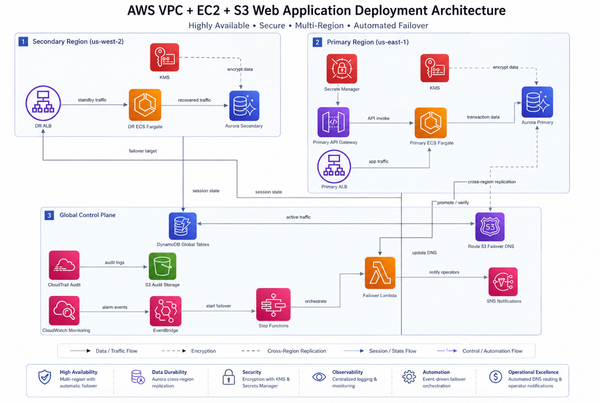
A sound default is CloudFront for static assets, an ALB for dynamic requests, Fargate tasks in private subnets, and Aurora in isolated database subnets. That diagram is not production evidence by itself: health checks, secret retrieval, database connections, outbound network paths, cache behavior, scaling limits, backups, and alarms must be designed and tested together.
Start with the smallest availability and egress model that meets the workload requirement. Do not copy three NAT gateways, a provisioned database, or multi-Region failover into a stack before the recovery and traffic requirements justify them.
Before you start
| Level | Intermediate |
| You should already know | VPCs, ECS services, ALB target groups, relational databases, and CDN caching |
| Reading time | 14 minutes |
| Practice time | 25 minutes |
| Evidence | AWS behavior and cited prices are sourced; architecture and CDK are illustrative |
| Pricing checked | 25 July 2026 |
| Technical review | Pending human technical review |
By the end, you will be able to:
- Trace a request and dependency call across every network boundary.
- Choose NAT gateways, gateway endpoints, and interface endpoints from actual traffic.
- Define application, load-balancer, database, and secret-rotation health signals.
- Produce a cost model with named capacity and traffic assumptions.
Why this matters
VPC + ALB + Fargate proves that a container can receive traffic. It does not prove:
- a new task becomes healthy before an old task is removed;
- a traffic spike can scale without exhausting Aurora connections;
- tasks can retrieve images, logs, and secrets from private subnets;
- database credentials rotate without breaking existing or new connections;
- CloudFront serves the intended object version;
- backups can be restored;
- the monthly cost matches the workload assumptions.
Production readiness is the evidence that these failure and recovery paths work. It is not the number of AWS services in the diagram.
Architecture at a glance
Users
  |
  v
CloudFront
  |-- /assets/* -> private S3 origin through Origin Access Control
  |
  `-- dynamic path, if required -> public ALB
                                      |
                                      v
                              Fargate service
                              private app subnets
                                |          |
                                |          `-> AWS APIs through endpoints or NAT
                                v
                         Aurora writer/reader
                         isolated DB subnets

CloudWatch receives metrics and logs.
Secrets Manager or Aurora-managed credentials provide database secrets.
CloudFront does not make the ALB private automatically. If CloudFront fronts the dynamic origin, define how requests are restricted to the intended path and how origin access is authenticated or filtered. If CloudFront serves only static assets, users can call the public ALB directly unless a separate control prevents it.
Origin Access Control applies to an S3 bucket origin, not the S3 static-website endpoint. Keep the bucket private and grant the CloudFront distribution the required read access.
Build the traffic and health contract first
The container needs at least three distinct checks:
- Process health: is the container process alive?
- Readiness: can the application serve a request with required dependencies?
- External path: can the ALB route to the task with the intended protocol, port, path, and status matcher?
AWS documents that newly registered ALB targets need one successful health check to become healthy. The interval and healthy threshold affect recovery and deployment speed for targets returning from an unhealthy state. Set them from measured startup and recovery time rather than copying an aggressive interval.
An illustrative CDK fragment:
// Illustrative
const service = new ecsPatterns.ApplicationLoadBalancedFargateService(
  this,
  "WebService",
  {
    cluster,
    taskDefinition,
    desiredCount: 2,
    publicLoadBalancer: true,
    taskSubnets: { subnetType: ec2.SubnetType.PRIVATE_WITH_EGRESS },
  }
);

service.targetGroup.configureHealthCheck({
  path: "/ready",
  healthyHttpCodes: "200",
  interval: Duration.seconds(30),
});

const scaling = service.service.autoScaleTaskCount({
  minCapacity: 2,
  maxCapacity: 10,
});

scaling.scaleOnRequestCount("RequestsPerTarget", {
  targetGroup: service.targetGroup,
  requestsPerTarget: 800,
});
The capacity and request target are illustrative. Measure CPU, memory, latency, connection count, and requests per task under representative load before choosing them.
Protect Aurora from container scaling
Fargate can add tasks faster than a relational database can safely accept new connections. A task-count limit is therefore also a database-safety control.
For each task, record:
maximum application connections per task
× maximum running tasks
= worst-case application connections
Compare that result with the tested database connection budget after reserving capacity for administration, migrations, monitoring, and failover.
RDS Proxy can pool and share connections for supported Aurora versions and workloads. It is not automatic protection: session pinning and transaction behavior can reduce multiplexing, so monitor proxy and database connection metrics if it is used.
Aurora can manage the master user password in Secrets Manager and rotate it. Application access should use a dedicated database identity rather than the master user. Test rotation while existing tasks are serving traffic and while new tasks start, because cached credentials and long-lived connection pools can hide a failure until the next deployment.
Choose the private egress path deliberately
Private Fargate tasks commonly need ECR image layers, CloudWatch Logs, Secrets Manager, S3, and sometimes public internet APIs.
Three NAT gateways are not automatically required by Fargate. The choice depends on availability, traffic destinations, operational simplicity, and cost:
- An S3 gateway endpoint has no additional endpoint charge and avoids NAT processing for S3 traffic from associated route tables.
- Interface endpoints can privately reach services such as Secrets Manager, but incur endpoint-hour and data-processing charges.
- NAT gateways provide general outbound connectivity and incur gateway-hour, data-processing, and potentially cross-AZ or internet transfer charges.
- A workload calling public third-party APIs still needs an appropriate outbound path even if AWS-service endpoints are present.
Model bytes by destination. “Endpoints are always cheaper” and “one NAT per AZ is always worth it” are both incomplete statements.
Make caching part of the release design
Use versioned asset names such as:
/assets/app.7f38c2.js
Versioned assets let old and new application revisions coexist while CloudFront caches expire naturally. Reusing /assets/app.js for different content makes deployment correctness depend on invalidation timing and cache keys.
For dynamic responses, cache only when the application has an explicit freshness and authorization model. Never cache personalized responses solely because a broad path pattern matched.
What breaks and how you detect it
| Symptom or signal | Likely cause | What to inspect | Safe response |
|---|---|---|---|
| Tasks start and are repeatedly replaced | Readiness path, port, grace period, or target matcher is wrong | ECS stopped reason and ALB target-health reason | Restore known-good task definition; fix the measured readiness contract |
| Latency rises after scale-out | Aurora connection saturation or cold task initialization | DB connections, proxy metrics, task startup duration, ALB latency | Cap task scaling, pool connections, and pre-scale for predictable peaks |
| New tasks cannot retrieve secrets or images | Missing endpoint, NAT route, DNS, security group, or task-role permission | VPC flow logs, task events, endpoint policy, task role | Restore the required private path and least-privilege permission |
| Users receive old assets | Reused object names or incorrect cache policy | CloudFront cache status, object version, cache key | Roll forward with versioned assets or perform a controlled invalidation |
| Secret rotation succeeds but app connections fail later | Applications cache old credentials or rotation cannot reach the DB | rotation logs, secret versions, connection-pool behavior | Pause rotation changes, validate both current and previous versions, fix client refresh |
| Database failover causes extended errors | Client uses an instance endpoint or retry behavior is inadequate | connection string, DNS refresh, driver retry and timeout settings | Use the intended cluster/proxy endpoint and bounded retries |
Security and cost
Security baseline
- Keep tasks and database instances out of public subnets.
- Allow ALB-to-task traffic only on the application port and task-to-database traffic only on the database port.
- Use task roles rather than credentials stored in images or environment files.
- Restrict secret access to the exact application secret and KMS key where applicable.
- Keep the S3 origin private and use CloudFront Origin Access Control.
- Encrypt database storage and backups, require TLS for database connections, and test restore.
- Send application and infrastructure logs without recording secrets, tokens, or personal data.
Cost assumptions
The old article described each NAT gateway as roughly $100 per month before traffic and then treated three as a $300 baseline. AWS's public US East (Ohio) example on 25 July 2026 listed $0.045 per NAT gateway-hour and $0.045 per GB processed.
For three continuously provisioned gateways and a 730-hour month:
3 × 730 × $0.045 = $98.55 in gateway-hour charges
Data processing, cross-AZ transfer, and internet transfer are additional. This is not a full application estimate.
Aurora, Fargate, ALB, CloudFront, logs, Secrets Manager, public IPv4 addresses, interface endpoints, storage, backups, and data transfer must be calculated separately for the selected Region. Aurora Serverless v2 can scale to zero only on supported engine versions and configurations; storage and other cluster charges can continue, and resume latency must fit the application.
Practice: review the architecture before deploying it
Safety: This exercise creates no AWS resources, needs no credentials, and has no cleanup step.
Goal
Turn an architecture diagram into a testable production contract.
Steps
- Trace the user request, static asset request, image pull, log delivery, secret retrieval, and database connection.
- Mark every public, private-with-egress, and isolated subnet boundary.
- Write the maximum task count and connection count per task.
- Define readiness, ALB health, database saturation, and rotation-failure signals.
- List monthly capacity and traffic assumptions for every billable service.
- Define rollback for the task definition, assets, schema, and secret change separately.
Verify the result
The design is reviewable only when every network arrow has a route and permission, every scaling limit has a downstream reason, and every rollback has an immutable target.
Clean up
No resources are created.
Verify cleanup
Confirm that the exercise did not deploy a VPC, NAT gateway, interface endpoint, database, load balancer, or Fargate service.
Check your learning
- Why is a healthy container process insufficient production evidence?
- How can Fargate scaling overload Aurora even when CPU scaling works as configured?
- What is the hourly subtotal for three NAT gateways at $0.045 per hour over 730 hours?
- When can an S3 gateway endpoint reduce NAT charges?
Review the answers
- The application, ALB route, dependencies, and external request path can still be unhealthy.
- Each new task can open more database connections than the database connection budget allows.
3 × 730 × $0.045 = $98.55, before data processing and transfer.- When VPC resources access S3 through route tables associated with the gateway endpoint instead of a NAT path.
Before you ship
- [ ] Container, readiness, and ALB health checks are distinct and tested.
- [ ] Deployment minimum healthy capacity matches the availability requirement.
- [ ] Maximum task count fits the database connection budget.
- [ ] Secret rotation is tested with old and new tasks.
- [ ] Every AWS API and internet dependency has a documented egress path.
- [ ] Static assets are private, versioned, and served through the intended CloudFront policy.
- [ ] Cost assumptions include hours, requests, bytes, storage, logs, backups, and transfer.
- [ ] Database restore and application rollback are exercised independently.
Sources and verification
- Optimize load-balancer health checks for Amazon ECS
- Create target-tracking scaling for an ECS service
- Manage Aurora passwords with Secrets Manager
- CloudFront S3 origin and Origin Access Control settings
- S3 gateway VPC endpoints
- Amazon VPC and NAT gateway pricing
- Aurora Serverless v2 auto-pause requirements
- Code status: Illustrative. No deployed stack is claimed.
- Technical review: Pending human technical review.
Continue learning
- Next lesson: AWS IAM and VPC Security Enforced as Code
- Related reference: AWS CodeDeploy on EC2 Auto Scaling
Correction history
- 2026-07-25: Removed invented incident language and unsupported fixed-cost claims; added explicit traffic, connection, secret, health, caching, egress, and recovery boundaries.