AWS CodeDeploy on EC2 Auto Scaling: ALB Health, Rollback, and Safe Releases
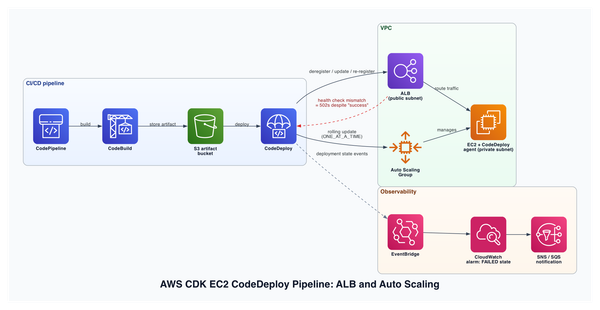
For an EC2 application behind an ALB, associate the Auto Scaling group and target group with the same CodeDeploy deployment group. Add application lifecycle validation, CloudWatch alarms, and automatic rollback before treating a successful pipeline state as evidence that users can reach the new revision.
The pipeline being green is only one signal. The release is healthy when the deployment succeeded, the expected revision is on every intended instance, the target group is healthy, and the application check passes through the real traffic path.
Before you start
| Level | Intermediate |
| You should already know | Auto Scaling groups, ALB target groups, AppSpec files, and pipeline stages |
| Reading time | 12 minutes |
| Practice time | 20 minutes |
| Evidence | AWS service behavior is sourced; CDK and review exercise are illustrative |
| Technical review | Pending human technical review |
By the end, you will be able to:
- Explain the launch and deployment lifecycle for a scaled-out EC2 instance.
- Configure the deployment group around the real Auto Scaling and ALB boundaries.
- Diagnose mismatched application, CodeDeploy, and load-balancer health.
- Define a rollback and verification procedure that does not depend on the pipeline colour.
Why this matters
An EC2 release can involve four independent state machines:
- CodePipeline moves an artifact through stages.
- CodeDeploy runs lifecycle hooks on instances.
- Auto Scaling launches, replaces, and terminates instances.
- The ALB decides whether each target can receive traffic.
If these systems are only loosely connected, a release can complete while users still receive errors. A common example is an ApplicationStart script that exits successfully before the process has warmed its cache, opened its listener, or passed the ALB health check.
The correction is not another sleep command. It is to make each boundary observable and to let unhealthy application or traffic signals stop the deployment.
Architecture at a glance
Source -> CodePipeline -> build artifact in S3
                           |
                           v
                     CodeDeploy
                    /          \
        Auto Scaling group      ALB target group
          launch lifecycle       deregister / register
                    \          /
                     EC2 revision
                           |
                  AppSpec lifecycle checks
                           |
                CloudWatch alarms + rollback
When CodeDeploy is associated with an Auto Scaling group, it installs managed Auto Scaling lifecycle hooks. During scale-out, a new instance can remain in Pending:Wait while CodeDeploy performs a launch deployment. CodeDeploy sends lifecycle heartbeats while it works and then tells Auto Scaling to continue or abandon the launch.
When a load balancer is configured for an in-place deployment, CodeDeploy can deregister the instance being updated, wait for connection draining, and register it again after deployment. That connection is why the target group belongs in the deployment-group definition rather than in a separate, undocumented manual step.
Wire the deployment group to both boundaries
The following CDK TypeScript is illustrative:
// Illustrative
const deploymentAlarm = new cloudwatch.Alarm(this, "Deployment5xxAlarm", {
  metric: targetGroup.metrics.httpCodeTarget(
    elbv2.HttpCodeTarget.TARGET_5XX_COUNT
  ),
  threshold: 5,
  evaluationPeriods: 2,
});

new codedeploy.ServerDeploymentGroup(this, "DeploymentGroup", {
  application,
  autoScalingGroups: [asg],
  loadBalancer: codedeploy.LoadBalancer.application(targetGroup),
  deploymentConfig: codedeploy.ServerDeploymentConfig.HALF_AT_A_TIME,
  alarms: [deploymentAlarm],
  autoRollback: {
    failedDeployment: true,
    stoppedDeployment: true,
    deploymentInAlarm: true,
  },
});
The threshold, evaluation period, and deployment configuration must come from the workload's capacity and error budget. Copying these example values into production would be configuration by coincidence.
Keep one CodeDeploy deployment group per Auto Scaling group unless there is a tested reason to do otherwise. AWS warns that multiple deployment groups can install competing lifecycle hooks and start concurrent deployments on the same new instance.
Make application readiness explicit
An AppSpec file can run lifecycle event scripts such as BeforeInstall, AfterInstall, ApplicationStart, and ValidateService. Use them for different jobs:
BeforeInstall: stop or prepare the existing application safely.AfterInstall: place configuration and permissions needed by the revision.ApplicationStart: start the process and fail if it cannot start.ValidateService: call an application readiness endpoint and fail when the revision is not usable.
An illustrative validation script:
# Illustrative
set -euo pipefail
curl --fail --silent --show-error \
  --retry 12 \
  --retry-delay 5 \
  http://127.0.0.1:8080/ready
This local check proves that the process is ready on the instance. Separately verify the target through the ALB path, because security groups, listener rules, target ports, and health-check matchers can still make a locally healthy process unreachable.
Preserve a real rollback target
CodeDeploy rollback is a new deployment of a previously deployed revision. It is not a filesystem snapshot or an automatic restoration of every side effect.
That creates three requirements:
- Retain immutable application revisions long enough to satisfy the rollback policy.
- Record the artifact version or object version associated with each release.
- Keep database and external side effects backward compatible with the previous application revision.
If an S3 lifecycle policy deletes the only known-good artifact, the rollback policy still exists but cannot deliver the intended code. Artifact retention is therefore part of release reliability, not housekeeping.
CloudWatch alarms can stop a deployment and participate in automatic rollback. Choose alarms that reflect the new revision's impact: target 5xx responses, unhealthy hosts, latency, application error rate, or a workload-specific business failure signal.
Validate scale-out separately from a normal release
A fleet-wide deployment and an Auto Scaling launch deployment exercise different paths. Test both.
During scale-out, confirm:
- The instance enters the expected lifecycle wait state.
- CodeDeploy starts the launch deployment.
- The intended revision reaches the new instance.
- Application validation passes.
- The instance becomes
InService. - The target becomes healthy before receiving normal traffic.
AWS documents a subtle case: if scale-out happens during another deployment, the new instance can first receive the previously deployed revision, followed by an automatic deployment to bring outdated instances up to date. Monitoring must distinguish this transition from permanent revision drift.
What breaks and how you detect it
| Symptom or signal | Likely cause | What to inspect | Safe response |
|---|---|---|---|
| Pipeline succeeds but users see 502 responses | Application readiness and ALB health are not aligned | Target health reason, listener and target port, ValidateService output |
Stop or roll back; fix the readiness and target-group contract |
New instances remain in Pending:Wait |
CodeDeploy launch deployment or lifecycle hook is stuck | Auto Scaling activities, lifecycle hooks, CodeDeploy deployment and agent logs | Correct the failing deployment; do not delete healthy managed hooks blindly |
| Scale-out instances run an old revision | Launch deployment did not complete or follow-on deployment failed | Deployment history and revision identifier on the instance | Trigger a known-good fleet deployment after fixing the hook |
| Automatic rollback fails | Previous revision is missing or incompatible | Artifact bucket version, retention policy, rollback deployment logs | Restore or redeploy a known-good immutable artifact |
Deployment stops when an alarm is ALARM |
The alarm threshold is reached or alarm access fails | Alarm history and CodeDeploy service-role permissions | Treat the alarm as evidence; investigate before overriding |
Security and cost
Security baseline
- Use an instance profile with only the S3 artifact, log, and workload permissions the instance needs.
- Restrict the CodeDeploy service role to required deployment resources.
- Keep EC2 instances in private subnets and administer them through Systems Manager rather than inbound SSH where possible.
- Encrypt the artifact bucket and require TLS.
- Sign or otherwise verify the provenance of release artifacts.
- Do not store secrets in the AppSpec file, user data, or deployment scripts; retrieve them through a managed secret service at runtime.
Cost assumptions
This lesson does not publish a monthly total because EC2 type, desired capacity, ALB usage, artifact storage, logs, data transfer, and deployment frequency determine the result. CodeDeploy for EC2 may not be the dominant line item; the always-on instances, load balancer, NAT or endpoints, and observability frequently matter more.
Estimate the complete steady-state and deployment overhead for the selected Region before release. Include extra capacity required by the deployment configuration and the retention cost of immutable artifacts and logs.
Practice: review a deployment contract
Safety: This exercise creates no AWS resources, requires no credentials, and has no cleanup step.
Goal
Produce a release contract that proves an EC2 revision is safe to receive traffic and safe to roll back.
Steps
- Name the Auto Scaling group, target group, CodeDeploy deployment group, and artifact location.
- Define what
ApplicationStartandValidateServiceeach prove. - Choose one ALB signal and one application signal that can stop the deployment.
- State the minimum healthy capacity during deployment.
- Identify the immutable previous revision and its retention period.
- Write the scale-out test separately from the normal release test.
Verify the result
Another engineer must be able to answer: “Which revision is running, can it receive traffic, and what exact artifact will rollback deploy?”
Clean up
No resources are created.
Verify cleanup
Confirm that no deployment, scaling action, or alarm change was performed while completing the review.
Check your learning
- Why should the target group be part of the CodeDeploy deployment group?
- What does a
ValidateServicehook prove thatApplicationStartdoes not? - How does CodeDeploy implement rollback?
- Why must scale-out be tested separately from a normal fleet deployment?
Review the answers
- It lets CodeDeploy coordinate traffic draining and registration with the instance deployment.
- It can test application readiness after the process starts; process start alone does not prove usable service.
- It creates a new deployment using a previously deployed revision.
- Auto Scaling launch deployments use managed lifecycle hooks and can expose revision or hook failures that a normal deployment does not.
Before you ship
- [ ] The deployment group references the intended Auto Scaling group and target group.
- [ ] One deployment group owns the Auto Scaling lifecycle hooks.
- [ ] Application start and readiness are tested separately.
- [ ] ALB health checks match the real protocol, port, path, and success codes.
- [ ] CloudWatch alarms can stop the deployment.
- [ ] Automatic rollback conditions are enabled and exercised.
- [ ] Previous artifacts are immutable and retained.
- [ ] A controlled scale-out proves new instances receive the intended revision.
Sources and verification
- Integrating CodeDeploy with EC2 Auto Scaling
- Using a load balancer with CodeDeploy EC2 deployments
- CodeDeploy AppSpec lifecycle hooks
- Monitoring CodeDeploy with CloudWatch alarms
- CodeDeploy rollback and redeployment
- Code status: Illustrative. No deployment is claimed for the CDK or shell examples.
- Technical review: Pending human technical review.
Continue learning
- Next lesson: AWS CDK Web App Deployment: Fargate, Aurora, and CloudFront
- Related reference: Troubleshoot CodeDeploy Auto Scaling issues
Correction history
- 2026-07-25: Completed the previously truncated article; removed unsupported deployment-frequency thresholds and added documented Auto Scaling, load-balancer, alarm, and rollback behavior.