Connecting S3 directly to Lambda is the fastest way to process an upload, but it has no buffer: a slow downstream dependency or a burst of uploads turns into throttled invocations and lost visibility into what failed. This article compares the direct trigger against putting SQS in the middle, and shows exactly when the extra queue is worth it.
Last reviewed: 23 July 2026. Sources: AWS Lambda, S3, and SQS documentation, linked throughout.
In 30 Seconds
Use this when:
Uploads arrive in bursts, losing a processing attempt would cause real harm, or the downstream system (a database, a third-party API, another Lambda) can be slower or less available than S3 itself.
Avoid this when:
One uploaded object should trigger one simple, fast, idempotent operation with no downstream dependency likely to throttle or fail — direct notifications are simpler and cheaper.
Recommendation:
Connect S3 directly to Lambda for simple, low-risk, single-consumer processing. Put SQS between S3 and Lambda once retries, backpressure, or guaranteed at-least-once delivery under load matter more than minimizing components.
Primary trade-off:
SQS adds a queue to operate, a small delay, and a dead-letter queue to monitor, in exchange for buffering, controlled concurrency, and a durable retry path that direct invocation does not provide.
Evidence level:
Derived from AWS documentation and published service behavior (S3 event notifications, Lambda event source mappings, SQS visibility timeout semantics); cost figures are illustrative estimates — confirm against current AWS pricing before using them in a business case.
The Problem
A team processes uploaded files — resizing images, parsing documents, indexing data — using S3 event notifications that invoke a Lambda function directly. This works cleanly in development and in early production: one file lands, one invocation runs, the result is written somewhere, done.
The design starts breaking under conditions that don't show up in a small test: a batch import drops 5,000 objects into the bucket within a few seconds, and S3 fires 5,000 events at once. Lambda's concurrency scales quickly, but not instantly, and a downstream dependency — an RDS connection pool, a third-party API with a rate limit, another Lambda function — starts throttling. Direct S3-to-Lambda invocation is asynchronous but has no queue of its own beyond Lambda's internal retry (two automatic attempts, then the event is dropped or sent to an on-failure destination if one is configured). Under sustained load, that's not enough of a buffer, and processing failures are easy to lose track of because there is no default place to inspect what didn't get processed.
The decision the team has to make: keep the invocation as direct and simple as it is today, or add SQS as a buffer between S3 and Lambda, at the cost of an extra component to configure, monitor, and pay for.
The Decision
Should S3 object-created events invoke Lambda directly, or should they be delivered to an SQS queue that Lambda then polls?
Evaluation criteria:
- reliability (what happens to an event during a downstream failure or a burst)
- cost (per-request pricing on both paths, plus the queue itself)
- security (permissions on each hop, dead-letter access)
- observability (visibility into failed or delayed processing)
- implementation complexity (what has to be built and maintained)
- operational ownership (who watches the queue and the dead-letter destination)
- expected scale (steady trickle of uploads vs. bursty batch arrivals)
- recovery requirements (can a failed event be inspected and replayed)
Architecture at a Glance
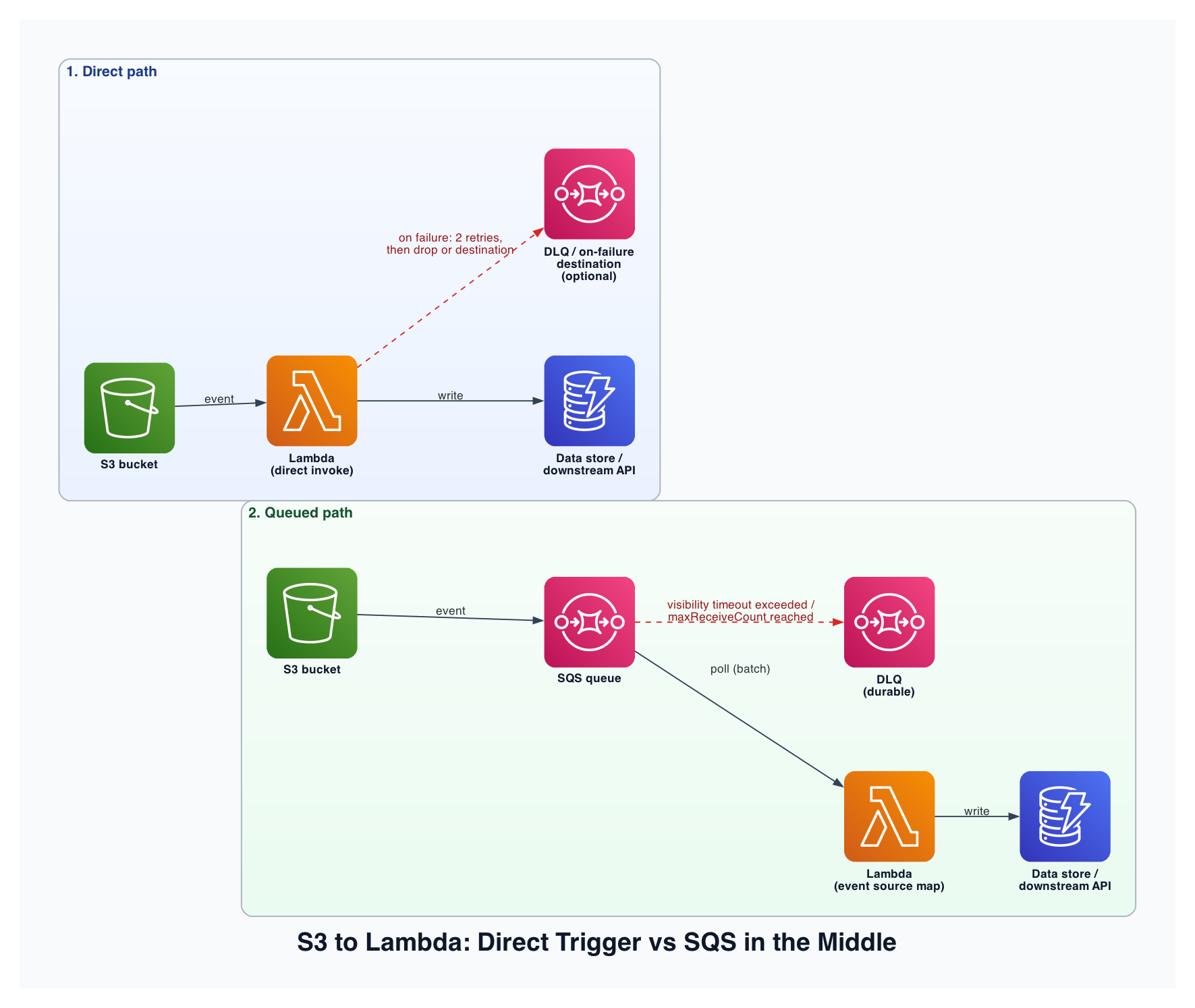
In the direct path, S3 invokes Lambda asynchronously; Lambda's built-in retry policy (two attempts by default) is the only buffer, and an on-failure destination (SQS, SNS, or another Lambda) is optional but not automatic. In the queued path, S3 writes the event to SQS, and Lambda's event source mapping polls the queue in batches, controlling concurrency explicitly. A message that fails processing becomes visible again after the visibility timeout and is retried up to maxReceiveCount times before moving to a dead-letter queue — a durable, inspectable failure path that exists by default once configured, not as an afterthought.
Options Considered
| Option | Best for | Main advantage | Main limitation | Operational burden |
|---|---|---|---|---|
| Direct S3 → Lambda | Simple, low-volume, single-consumer processing | Fewest components, lowest latency, no queue to manage | Only two built-in retries, no backpressure control, harder to inspect failures | Low |
| S3 → SQS → Lambda | Bursty uploads, at-least-once delivery requirements, controlled concurrency | Durable buffering, configurable concurrency via batch size/reserved concurrency, built-in DLQ | Added latency (typically sub-second to a few seconds), one more resource to monitor and pay for | Medium |
| S3 → EventBridge → (multiple targets) | Multiple independent consumers, advanced filtering, fan-out | Content-based filtering, many consumers from one event, centralized routing | Additional cost per event, another layer to reason about, unnecessary for a single consumer | Medium-High |
EventBridge is included as a boundary case: it solves a different problem (fan-out to multiple independent consumers with filtering) than SQS does (buffering and controlled delivery to a single consumer). Don't reach for EventBridge just because "more flexibility is generally good" — it adds cost and a layer with no benefit if there's only one downstream consumer.
Recommendation
Recommended: Use direct S3-to-Lambda notifications when one bucket (or prefix) drives one consumer, the operation is fast and idempotent, and occasional event loss under an extreme, unexpected failure is an acceptable risk. Put SQS in the middle once any of the following is true: uploads arrive in bursts that could exceed what the downstream dependency can absorb, losing a processing attempt would cause real harm (billing, compliance, user-visible data loss), or you need a durable, inspectable place to see and replay what failed.
The deciding factor is what happens when something goes wrong downstream, not raw event volume. A steady trickle of 10,000 events a day with a fast, reliable downstream system can run safely on the direct path. A bursty 500 events in ten seconds against a downstream system with any real chance of throttling needs the buffering and controlled concurrency SQS provides.
The recommendation changes when:
- the consumer needs strict ordering per object key — neither direct invocation nor standard SQS guarantees order; FIFO SQS is required, with its own throughput trade-offs
- multiple independent services need to react to the same upload — that's an EventBridge fan-out problem, not a buffering problem
- the processing is synchronous and user-facing (the uploader is waiting for a result) — neither async pattern fits; consider S3 pre-signed URLs with synchronous processing or Step Functions instead
How the Architecture Works
- A client uploads an object to S3, completing a PUT.
- S3 emits an s3:ObjectCreated:* event, either invoking Lambda directly or writing a message to SQS, depending on the configured destination.
- For the queued path, the message sits in SQS until a Lambda poller (the event source mapping) picks it up in a batch.
- Lambda processes the object — reading it from S3, transforming it, and writing the result downstream.
- On failure: direct invocation retries twice, then drops the event or routes it to an on-failure destination if configured; the queued path makes the message visible again after the visibility timeout, retries it up to maxReceiveCount, then moves it to the DLQ.
- Metrics and logs are emitted — Lambda duration, error count, and (for the queued path) queue depth and age of oldest message.
- Operators are alerted when the DLQ receives a message or when queue age exceeds an acceptable threshold, indicating the consumer is falling behind.
Implementation
1. Establish the boundary
Decide the trigger source: an S3 event notification pointed at Lambda directly, or at an SQS queue that Lambda then polls via an event source mapping. Both live in the same account and region as the bucket for the simplest setup.
2. Create the core resource
SQS queue with a matched DLQ (queued path):
{
  "QueueName": "uploads-processing-queue",
  "VisibilityTimeout": "180",
  "RedrivePolicy": {
    "deadLetterTargetArn": "arn:aws:sqs:<region>:<account>:uploads-processing-dlq",
    "maxReceiveCount": 5
  }
}
Set VisibilityTimeout to at least 6x the Lambda function's timeout, so a message isn't redelivered while still being processed by a slow-running invocation.
3. Add permissions
The S3 bucket policy (or notification configuration) needs sqs:SendMessage scoped to the specific queue ARN. Lambda's execution role needs sqs:ReceiveMessage, sqs:DeleteMessage, and sqs:GetQueueAttributes scoped to that same queue — not sqs:* on all resources.
4. Connect the components
For the direct path: configure the S3 bucket's event notification to target the Lambda function ARN, granting S3 lambda:InvokeFunction permission via a resource-based policy. For the queued path: configure the notification to target the SQS queue ARN, and attach an event source mapping from that queue to the Lambda function, setting batch size and (optionally) maximum concurrency.
5. Add failure handling
For the direct path, configure an on-failure destination (SQS, SNS, or another Lambda) — without one, failed events after two retries are simply dropped. For the queued path, the DLQ is the failure destination; set maxReceiveCount low enough to fail fast (3-5) rather than retrying a permanently broken message dozens of times.
6. Add observability
Emit structured logs with the S3 object key and a correlation ID on every invocation. Add CloudWatch alarms on ApproximateAgeOfOldestMessage (queue falling behind) and ApproximateNumberOfMessagesVisible on the DLQ (something is failing repeatedly). For the direct path, alarm on the Lambda Errors metric and, if configured, on messages landing in the on-failure destination.
Failure Modes
| Failure | What the user sees | Detection | Recovery | Prevention |
|---|---|---|---|---|
| Downstream dependency throttling | Processing delay or silent event loss (direct path) | Lambda error rate, throttle metric | Queued path retries automatically; direct path needs an on-failure destination to recover at all | Put SQS in the middle when downstream throttling is plausible |
| Burst of uploads exceeds concurrency | Some objects processed late or not at all (direct path) | Lambda concurrent execution metric near account/function limit | Reserved concurrency plus SQS buffering absorbs the burst | Load-test with a realistic burst before launch |
| Poison message (malformed object, unhandled edge case) | Repeated identical failures | DLQ message count increasing | Inspect the DLQ message, fix the handler, replay manually | Schema/format validation early in the handler |
| Lambda processes the same message twice | Duplicate downstream writes | Application-level duplicate detection, if instrumented | Make the write operation idempotent | Idempotency key derived from the S3 object key and version ID |
| Visibility timeout too short | Message redelivered while still being processed, causing duplicate work | Duplicate invocation logs for the same message ID | Increase visibility timeout relative to function timeout | Set visibility timeout to 6x function timeout as a starting point |
Security and IAM
Scope every permission to the specific resource, not the resource type. The S3 bucket's permission to invoke Lambda or write to SQS should reference the specific function or queue ARN, not a wildcard. Lambda's execution role should be limited to s3:GetObject on the specific bucket/prefix it reads from, and to the specific SQS queue ARNs (main queue and DLQ) it needs — never s3:* or sqs:* with Resource: "*".
If the uploaded objects contain sensitive data, encrypt the bucket with SSE-KMS and grant the Lambda execution role kms:Decrypt on that specific key, rather than relying on default encryption alone. The DLQ should have the same access restrictions as the main queue — it's easy to leave a dead-letter queue with looser permissions since it's added later, and it often contains the same sensitive payloads as the main flow.
Cost Model
Fixed costs: none required for the direct path. The SQS queue itself has no fixed monthly charge (billed per request) — the "fixed" cost here is operational: someone must monitor it.
Variable costs: S3 event notification delivery (no additional charge beyond standard S3 request pricing); Lambda invocation count and duration (identical calculation on both paths); SQS requests — each SendMessage, ReceiveMessage, and DeleteMessage counts separately; CloudWatch Logs and alarm evaluations.
Assumptions used for illustration:
| Input | Assumption |
|---|---|
| Uploads per month | 10 million |
| Average Lambda duration | 300 ms |
| Memory allocation | 512 MB |
| SQS batch size | 10 messages per poll |
| Region | 1 |
At this volume, SQS's own request cost is a small fraction of the total bill compared to Lambda compute — the queue itself rarely dominates the cost decision. The real cost trade-off is indirect: the direct path can silently drop events under load (an invisible cost in the form of lost/unprocessed work), while the queued path makes that failure durable and visible at the cost of a few extra API calls per message. Confirm current rates against the AWS Lambda pricing page and Amazon SQS pricing page before using these figures in a business case.
Observability and Operations
Metrics: Lambda invocation count, error count, duration; for the queued path, ApproximateNumberOfMessagesVisible, ApproximateAgeOfOldestMessage, and DLQ message count.
Alarms: DLQ message count above zero, queue age exceeding an acceptable processing delay (for example, 5 minutes), sustained Lambda error rate above baseline.
Logs: every invocation should log the S3 object key, object version ID (if versioning is enabled), and a correlation/request ID, structured as JSON.
Tracing: X-Ray or OpenTelemetry instrumentation across the Lambda function and any downstream call it makes — neither S3 nor SQS instruments this automatically.
Dashboard: an operator responding to an incident needs, at minimum: current DLQ depth, current queue age (if queued), and recent Lambda error rate, on one screen.
Ownership: the team that owns the processing logic owns the DLQ and is responsible for triaging and replaying failed messages — a DLQ that nobody watches is equivalent to silently dropping events, just with extra steps.
Validation
Functional validation: expected upload triggers processing and produces the expected downstream write; a malformed object is rejected without crashing the function for other messages; duplicate delivery (same object processed twice) does not produce duplicate downstream side effects.
Failure validation: simulate downstream throttling and confirm the queued path retries rather than losing the event; simulate a burst of uploads and confirm concurrency and (if queued) queue depth behave as expected; force a poison message and confirm it lands in the DLQ after the configured retry count, not before and not indefinitely.
Operational validation: DLQ alarm fires when a message lands there; queue-age alarm fires when processing falls behind; logs contain the object key and correlation ID needed to trace a specific failure; a DLQ message can actually be inspected and replayed successfully.
When Not to Use This
- The workload is truly one bucket, one consumer, low volume, and the operation is cheap to lose and retry manually — direct invocation is simpler and the queue adds cost without meaningful benefit.
- The team has no on-call process to watch a DLQ — adding SQS without anyone monitoring it just moves the failure mode from "silently dropped" to "silently queued and never processed," which is not an improvement.
- Processing must happen synchronously in the same request the uploader is waiting on — neither pattern here is synchronous; that calls for a different architecture entirely (pre-signed URL plus synchronous API, or Step Functions with a callback).
- Strict per-key ordering is required — standard SQS and direct Lambda invocation both process concurrently without ordering guarantees; that requires FIFO SQS, with its own throughput ceiling.
What I Would Change at Different Scales
Small workload: direct S3-to-Lambda invocation, with an on-failure destination configured from day one (an SNS topic or a simple SQS queue) so failures aren't silently dropped even without full queue-based processing.
Growing workload: move to S3 → SQS → Lambda once uploads become bursty or the downstream dependency shows any sign of throttling. Set a DLQ with a low maxReceiveCount, and add the queue-age and DLQ-depth alarms before the volume grows further, not after an incident.
High-scale or regulated workload: add per-tenant or per-prefix queues if isolation between customers or workloads matters, use FIFO SQS with per-key message group IDs if ordering is required, and document a DLQ replay runbook with clear ownership so failed-message triage doesn't depend on one person's tribal knowledge.
Final Decision
Connect S3 directly to Lambda when the workload is simple, low-volume, and safe to occasionally retry or lose. Put SQS between S3 and Lambda once bursts, downstream fragility, or the cost of a lost event make durable buffering and a real dead-letter path worth the extra component. The decision isn't about which pattern is more advanced — it's about whether your downstream system can absorb load spikes on its own, or needs SQS to absorb them for it.
Knowledge Check
- What is the default number of automatic retries Lambda performs on a direct S3 invocation before dropping the event or routing it to an on-failure destination?
- Which SQS setting must be set to at least 6x the Lambda function's timeout, and why?
- If three independent services need to react to the same S3 upload, which pattern fits better than either direct invocation or a single SQS queue?
- What happens to a message in the queued path once it exceeds maxReceiveCount?
Answers: (1) two automatic attempts; (2) VisibilityTimeout, to prevent the message from becoming visible again and being redelivered while it's still being processed; (3) EventBridge, for fan-out to multiple independent consumers with filtering; (4) it moves to the dead-letter queue for inspection and manual replay.
Action Checklist
- Confirm expected upload volume and burst shape (steady trickle vs. batch arrivals)
- Identify how the downstream dependency behaves under load (does it throttle?)
- Choose direct invocation or SQS based on that failure tolerance, not event volume alone
- Configure a dead-letter destination either way — never let failures go silently unhandled
- Scope all IAM permissions to specific bucket/queue/function ARNs
- Add DLQ-depth and queue-age alarms before launch
- Test a burst and a poison message before relying on this in production
- Document who owns triaging and replaying the dead-letter queue
Continue Learning
- S3 Events to Lambda: Direct Notifications vs EventBridge
- Designing Idempotent Lambda Processors for At-Least-Once Delivery
- Dead-Letter Queue Runbooks: What to Do When a Message Lands There
Call to Action
Request an Architecture Decision Review.