
Building a Production-Ready Computer Vision Pipeline on AWS with Terraform
A complete guide to designing a scalable, secure computer vision pipeline on AWS using Terraform, Rekognition, and real-time video analytics.

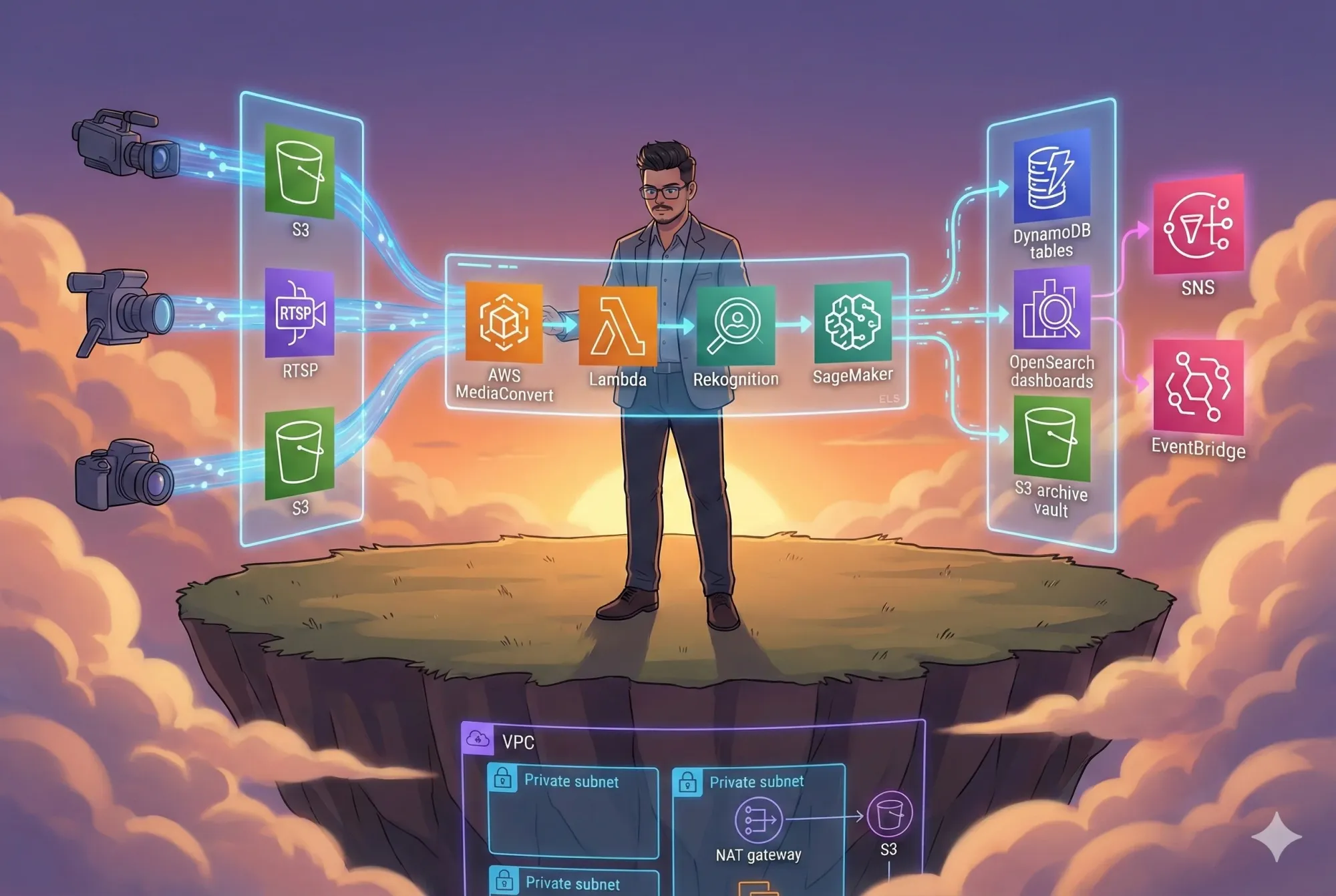
Real-time video analytics sounds exciting until you try to build it.
Once you move beyond demos, you quickly run into very real challenges: large video files, live streams, AI inference at scale, strict security requirements, and cloud costs that can spiral if the architecture isn’t right. Most tutorials stop early. This blog doesn’t.
What follows is a clear, production-focused walkthrough of a computer vision pipeline on AWS, provisioned with Terraform. The goal is simple: explain how it works, why each piece exists, and how it fits together, without hype or unnecessary complexity.
Who This Is For
This article is written for people who build real systems:
- Cloud and DevOps engineers
- ML engineers working with video data
- Architects responsible for security, scale, and cost
- Anyone looking for a practical reference, not a toy example
You don’t need to know every AWS service in advance. Each section focuses on intent first, then implementation.
The Core Problem
Video analytics combines several hard problems into one system:
- Video is heavy and slow to process
- Live streams require event-driven design
- AI inference must scale automatically
- Security and compliance are mandatory
- Costs must stay predictable
The purpose of this project is to solve those problems with a clean, understandable architecture that can actually run in production.
System Architecture: One Layer at a Time
Before diving into data flow or code, it helps to understand the structure of the system.
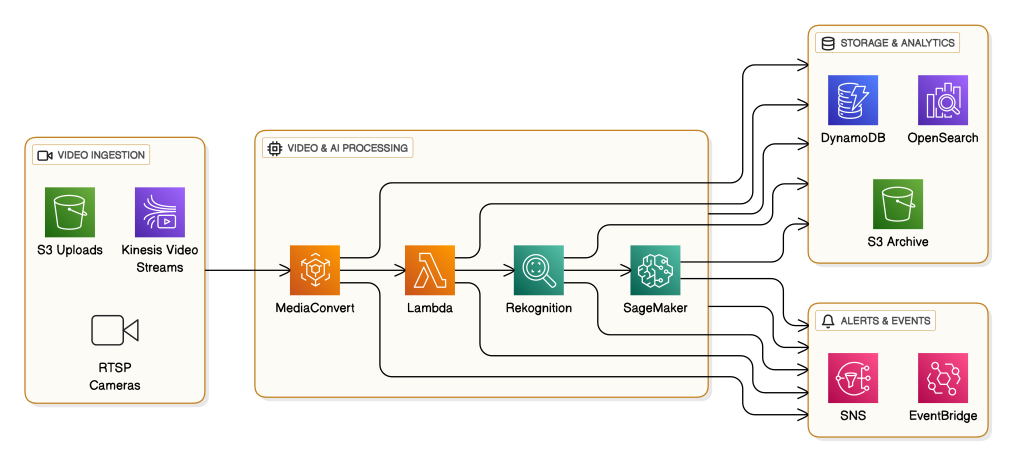
Each layer has a single responsibility:
- Ingestion brings video into the system
- Processing handles transcoding and AI inference
- Storage keeps results queryable and affordable
- Alerts react to important events in real time
This separation keeps the system flexible and easy to operate.
Data Flow: Following a Single Video
Now let’s follow one video through the pipeline.
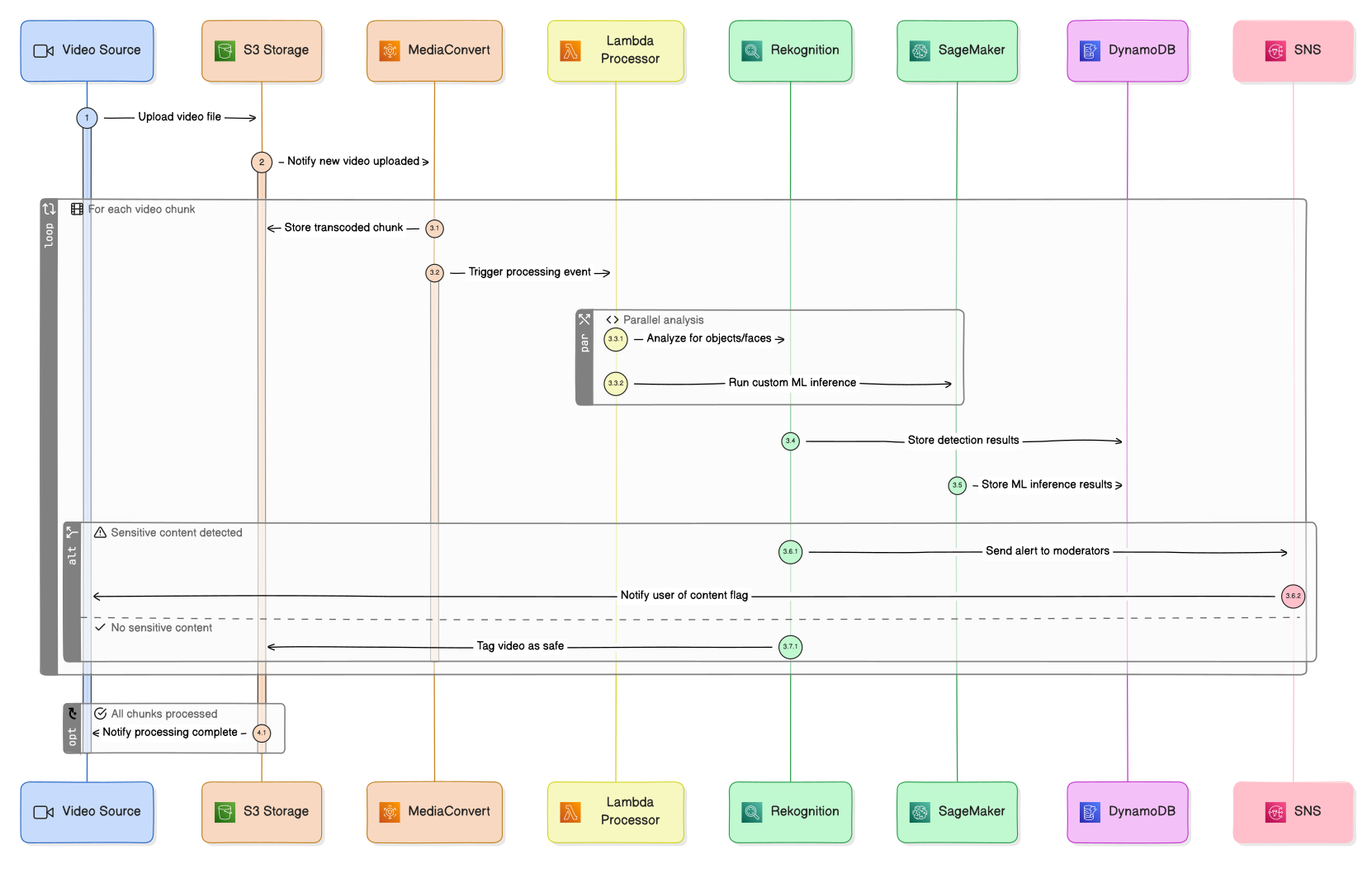
This flow is intentionally event-driven. There’s no polling and no central orchestrator trying to do everything. Each step reacts to the previous one, which makes the system easier to scale and easier to debug.
Why Transcoding Comes Early
Raw video isn’t friendly to AI workloads. Different formats, resolutions, and bitrates slow processing and increase cost.
Using MediaConvert early in the pipeline gives you:
- Consistent formats
- Predictable frame sizes
- Faster inference
- Lower compute overhead
It’s not the most visible part of the system, but it’s one of the most important.
AI Processing: Managed Services First, Custom Models When Needed
The pipeline uses two complementary approaches:
- Managed computer vision for common tasks
- Object detection
- Face detection and recognition
- Custom models for domain-specific logic
- Industry-specific detection
- Specialized inference
Lambda coordinates these calls and keeps the workflow simple. You get flexibility without turning the system into a heavy ML-ops platform.
Storing Results Without Overengineering
AI output is only useful if you can retrieve and analyze it later.

Each datastore is chosen for a clear reason:
- DynamoDB for fast, reliable metadata access
- OpenSearch for querying and analytics
- S3 for low-cost long-term storage
No single database is forced to do everything.
Alerts and Event-Driven Reactions
Real-time systems should react immediately when something important happens.

This makes it easy to send notifications, trigger workflows, or integrate with other systems, without tightly coupling components together.
Network Architecture: Secure by Default
Everything runs inside a private VPC.
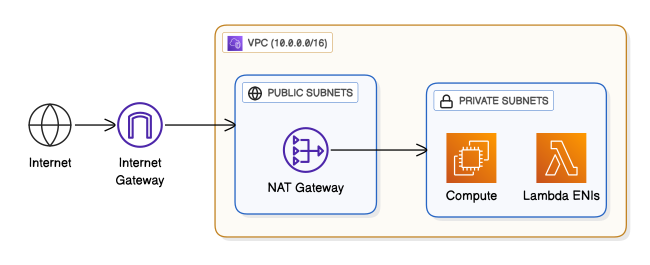
The rules are simple:
- Compute resources are never public
- No inbound internet access to EC2
- Outbound traffic is controlled
- Least-privilege security groups
This setup meets most enterprise security expectations out of the box.
Deployment Pipeline: Make Changes Safely
All infrastructure changes go through Terraform and CI/CD.

Every change is validated, scanned, cost-checked, and reviewed before it reaches production. This keeps deployments predictable and boring in a good way.
Terraform Structure: Easy to Understand, Easy to Extend

This modular structure makes the codebase easier to maintain, easier to reuse, and easier for new engineers to understand.
Monitoring: Visibility Is Not Optional

You get basic but essential visibility into system health and performance, with alerts when something goes wrong. From here, it’s easy to add logs, tracing, or more advanced metrics.
Cost Awareness
Approximate monthly costs:
| Environment | Estimated Cost |
|---|---|
| Development | $190 – $550 |
| Staging | $500 – $1,000 |
| Production | $900 – $4,000 |
Costs are controlled through right-sizing, spot instances, storage tiering, and cost estimation during the CI/CD process, before any deployment occurs.
Where This Architecture Fits Well
This setup works across many domains:
- Security and surveillance
- Retail analytics
- Traffic monitoring
- Manufacturing quality checks
- Healthcare imaging pipelines
It’s flexible enough to adapt without a full redesign.
Final Thoughts
This project isn’t about being clever. It’s about being clear, predictable, and reliable.
- The architecture is easy to reason about
- Each component has a clear purpose
- Security and cost are considered from the start
- The system scales without becoming fragile
If you’re building computer vision workloads on AWS, this gives you a solid, realistic foundation, one you can actually run and maintain in production.
👉 GitHub Repository:
GitHub - InfraTales/computer-vision-pipeline-infrastructure
Contribute to InfraTales/computer-vision-pipeline-infrastructure development by creating an account on GitHub.
 InfraTales
Author
Rahul Ladumor
Platform Engineer • AWS | DevOps | Cloud Architecture
🌐 Portfolio: https://acloudwithrahul.in
💼 GitHub: https://github.com/rahulladumor
🔗 LinkedIn: https://linkedin.com/in/rahulladumor
📧 Email: rahuldladumor@gmail.com
Rahul Ladumor - ASTM International | LinkedIn
👋 Hey, I'm Rahul, AWS Community Builder, three-time certified, and the guy start-ups… · Experience: ASTM International · Education: Indian Institute of Technology, Roorkee · Location: Surat · 500+ connections on LinkedIn. View Rahul Ladumor’s profile on LinkedIn, a professional community of 1 billion members.
 Rahul Ladumor
rahulladumor - Overview
Experienced Senior Software Developer & Architect with a passion for AWS & DevOps | Nodejs Expert | AWS Community Builder - rahulladumor


⭐ If this blog helped you, star the repository and share it with your team.
Built with ❤️ for engineers who value clarity, security, and scale.


